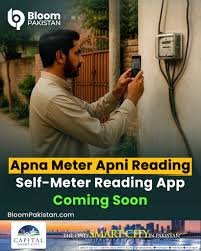
Self Meter Reading App for Electricity in Pakistan
Electricity bills in Pakistan have long sparked heated conversations: surprise high amounts, disputed readings,Self Meter Reading App and the awkward wait when a meter reader finally shows up. In 2025, the landscape began to change. The government and distribution companies introduced a national self meter reading system — popularly called “Apna Meter, Apni Reading” — delivered through the Power Smart mobile app and DISCO-specific portals, allowing consumers to photograph and submit their own meter readings. This guide explains why it matters, how it works, step-by-step usage, who can use it, tips to avoid mistakes, and what this means for Pakistan’s electricity future Self Meter Reading App
Why Self Meter Reading Matters
- Reduces billing disputes and incorrect readings.
- Makes the billing process transparent (you keep the photo as proof).
- Minimizes the need for physical visits by meter readers, saving time and cost.
- Helps consumers get accurate bills quickly if a dispute arises.
How to Submit Your Meter Reading in 5 Steps
- Download Power Smart (or your DISCO’s official app or portal).
- Register with your CNIC, mobile number, and Consumer Reference Number (CRN).
- On or near your meter reading date, open the app and take a clear photo of the meter display.Self Meter Reading App
- Enter the digits shown and upload the photo.
- Receive confirmation and keep the timestamped image for records.
What Changed in 2025: The Rollout
In mid-2025, Pakistan launched a nationwide push to let electricity consumers submit their own meter readings. The Power Smart app — backed by the federal government and integrated with many DISCO systems — became the main tool for this initiative. Within weeks of launch, over one million consumers had used the app, according to official reports. The initiative excludes some DISCOs like K-Electric in Karachi, which uses its own systems, while most others provide either the Power Smart app or similar options like SMS, portals, or their own apps. Self Meter Reading App
Who Can Use the Self Meter Reading App?
- Supported DISCOs: LESCO, MEPCO, GEPCO, FESCO, HESCO, PESCO, and others.
- Exceptions: K-Electric in Karachi currently uses its own system.
- Meter Types: Analog, digital, and smart meters are all supported.
- Multiple Meters: If you have more than one meter, register each CRN separately.
Registering and Submitting Your First Reading
Before You Start
- Your latest electricity bill (for CRN).
- Your CNIC and registered mobile number.
- A smartphone with a camera.
- Clear access to the meter.
Step 1: Download & Register
- Download the Power Smart app (Android/iOS) or your DISCO’s official app.
- Enter your CNIC, mobile number, and CRN to register. Self Meter Reading App
Step 2: Wait for Your Reading Window
Your DISCO follows monthly cycles. On your scheduled date, you’ll receive a notification (SMS or app). Missing the date may result in an estimated bill. Self Meter Reading App
Step 3: Take a Clear Photo
- Use natural light, avoid glare.
- Ensure all digits are visible.
- For analog meters, capture the full dial; for digital meters, the full display.
Step 4: Submit & Save Confirmation
- Enter the digits, upload the photo, and submit.
- Save the confirmation and the photo for your records.
Step 5: Validation
The DISCO validates your reading, checks for anomalies, and generates your bill. If your reading is within normal limits, it’s accepted without further verification. Self Meter Reading App
Common Problems & Solutions
Problem: “My number is not registered.”
Solution: Update your mobile number in the DISCO system or visit their office.
Problem: “Reading rejected.”
Reason: Blurry photo, unreadable digits, or unusual consumption.
Fix: Retake the photo, explain high usage in comments, and keep proof.
Problem: “Huge bill despite submission.”
Action: Compare submitted units with billed units, then lodge a complaint with your DISCO or NEPRA if unresolved. Self Meter Reading App
Benefits for Consumers
- Transparency: Photo evidence helps in disputes.
- Speed: Verified readings can generate bills faster than manual visits.
- Convenience: No need to wait for meter readers.
Security & Privacy
The app collects your CNIC, mobile number, CRN, and meter photo. Since the photo only shows the meter, there’s minimal privacy risk. Self Meter Reading App
- Keep your app updated.
- Avoid sharing OTPs or credentials.
- Only allow camera and storage permissions.
Tips for Perfect Meter Photos
- Clean the meter face.
- Take two shots: close-up and wide-angle showing the meter number.
- Enable timestamps if possible.
- Store photos in a labeled folder.
What Happens to Meter Readers?
DISCOs are shifting meter readers into other roles like inspection and quality control. A hybrid system will remain until smartphone access improves in all areas. Self Meter Reading App
Self Meter Reading App
electricity meter reading app Pakistan, submit meter reading online Pakistan, Power Smart app guide, how to read electricity meter Pakistan, self meter reading DISCO portal, Apna Meter Apni Reading, avoid electricity overbilling Pakistan, NEPRA consumer complaints billing.
Real-Life Example
Ali from Lahore had been receiving high bills for months. After registering on Power Smart, he submitted a clear photo and got his corrected bill within 48 hours — saving over 8,000 PKR. His story reflects many early adopter experiences. Self Meter Reading App
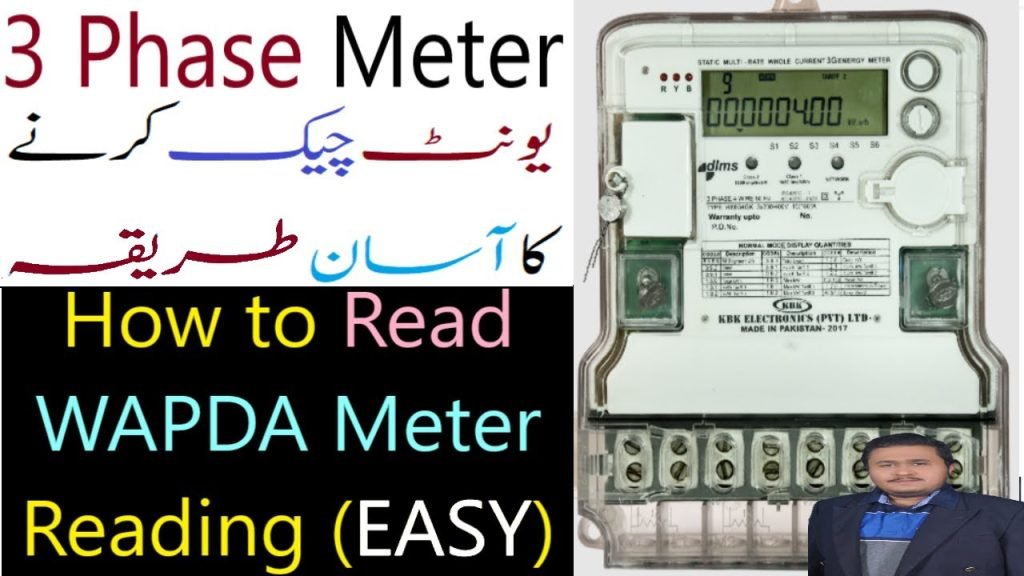
How to Easily Check and Read Your 3-Phase WAPDA Electricity Meter Units in Pakistan
- System checks reading against historical consumption.
- Flags big changes for manual review.
- Accepts normal readings and issues bills.
- Stores metadata for audits.
Costs
The app is free for consumers. Only special services like meter testing have charges.
Potential Roadblocks
- Limited internet access in rural areas.
- Tampered meters still require inspection.
- User errors in photo submission.
Complaints Process
- File a complaint with your DISCO.
- If unresolved, escalate to NEPRA via its complaint portal.
Final Thoughts
The self meter reading initiative is a big step toward transparency in Pakistan’s power sector. For consumers, it offers control, convenience, and proof against overbilling. For DISCOs, it improves efficiency and builds trust. The future success of this system will depend on adoption, training, and reliable validation. Self Meter Reading App