FESCO Light App: Your Ultimate Guide to Managing Electricity Bills and Outages
In today’s digital age, managing electricity services shouldn’t be a challenge. The FESCO Light App is a breakthrough mobile solution introduced by Faisalabad Electric Supply Company (FESCO) to simplify bill payments, outage updates, and complaint registration. Whether you live in Faisalabad, Sargodha, Jhang, or Toba Tek Singh, this app empowers you to control your electricity connection from your smartphone.
This detailed 2025 guide will explain everything you need to know about the FESCO Light App, how to use it, and how it can save you time and frustration.
What Is the FESCO Light App?
The FESCO Light App is an official mobile application developed by FESCO to offer its customers quick and secure access to essential electricity-related services. From checking your electricity bill to reporting faults and receiving outage updates, the app makes it easier than ever to stay connected and informed.
You no longer have to visit FESCO offices or wait on hold with customer support. With just a few taps, you can manage your electricity account with ease.
Why Did FESCO Launch This App?
Before the app, electricity consumers commonly experienced:
- Long queues for bill payments
- Difficulty tracking outages or complaints
- Inaccurate billing due to estimated meter readings
- Lack of transparency from the electricity provider
FESCO launched this app to provide a digital-first experience that improves efficiency, transparency, and customer satisfaction. Today, over 4 million customers benefit from the convenience the app offers.
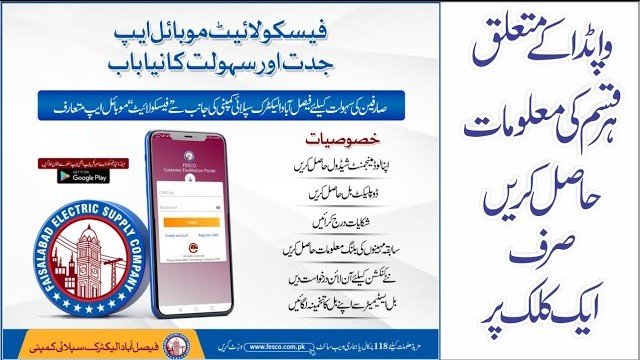
How to Download the FESCO Light App
The app is available on both Android and iOS platforms. Here’s how to get started:
For Android Users:
- Go to the Google Play Store
- Search for “FESCO Light App”
- Select the official app by FESCO
- Tap Install
For iPhone Users:
- Visit the Apple App Store
- Search for “FESCO Light”
- Download the official version
- Wait for installation and open the app
Make sure you only install the app from verified developers to avoid fake versions or scams.
How to Register and Log In
Using the app for the first time? Here’s how to register:
- Open the app
- Select Register New User
- Enter your Customer Reference Number (CRN) (found on your electricity bill)
- Enter your mobile number and create a password
- Confirm your registration with an OTP sent via SMS
- Log in with your registered credentials
Once registered, you’ll get access to all available services immediately.
Key Features of the FESCO Light App in 2025
1. View and Pay Electricity Bills
You can instantly check your current or past electricity bills. Payment options include:
- Bank accounts (HBL, UBL, Meezan Bank, etc.)
- Mobile wallets like JazzCash and Easypaisa
- Debit or credit cards
You can also download your bill in PDF format for future reference.
2. Report Complaints
If you’re facing a voltage issue, outage, or meter fault, you can register complaints directly through the app. Complaint categories include:
- Overbilling
- Meter problems
- Transformer failure
- Power theft
Track your complaint status within the app and get notified when it’s resolved.
3. Get Load Shedding and Outage Alerts
The app sends real-time notifications about:
- Scheduled maintenance
- Load shedding updates
- Unexpected faults in your area
This helps users plan their daily activities around the electricity schedule.
4. Submit Meter Readings
Avoid estimated bills by submitting your own meter reading every month. Simply:
- Take a photo of your meter
- Enter the numeric reading
- Submit it through the app before the deadline
This ensures accurate billing and helps avoid disputes.
5. Manage Multiple Connections
If you have more than one electricity connection (e.g., home, office, shop), you can add multiple CRNs and manage all accounts within one app dashboard.
Benefits of Using the FESCO Light App
Using the FESCO Light App offers numerous advantages, including:
- No need to visit FESCO offices for basic tasks
- Faster complaint resolution
- Transparency in electricity usage and bills
- Instant alerts about outages
- Safe and secure online payments
- Saves time and effort
How to Pay Your Bill Through the App
Paying your bill is simple:
- Open the app and log in
- Go to the Bill Payment section
- Choose the billing month
- Select a payment method
- Complete the transaction
- Download or screenshot the receipt
Some banks and wallets may offer cashback or rewards for using digital payment channels.
Troubleshooting Common Issues
App not working or crashing?
Try clearing your phone’s cache or reinstalling the app. Make sure your device has the latest OS version and enough storage space.
Forgot your password?
Click on Forgot Password, enter your registered mobile number, and follow the OTP verification process to reset it.
Not receiving outage alerts?
Make sure you’ve allowed notifications for the app in your phone settings.
How Does FESCO Light Compare to Traditional Methods?
| Service | Traditional Method | FESCO Light App |
|---|---|---|
| Bill Viewing | Physical copy or website | In-app digital copy |
| Bill Payment | Post office or bank | Mobile payment |
| Complaints | Call center | In-app registration |
| Outage Info | Manual check | Real-time alerts |
Real-Life User Feedback
Nabeel Ahmed, a small business owner in Faisalabad, shared his experience:
“I used to visit the FESCO office every month to pay my bill and submit complaints. Now, I just open the app. It’s reliable, fast, and saves me hours every month.”
Security and Data Privacy
The FESCO Light App is equipped with:
- OTP verification
- Encrypted data transmission
- Secure payment gateways
FESCO also ensures that user data is protected under Pakistan’s local data protection regulations.
Frequently Asked Questions (FAQs)
Is the FESCO Light App free to use?
Yes, it’s completely free for all FESCO consumers.
Can I use the app without internet?
No, an internet connection is required to access app features.
Can I add multiple CRNs under one account?
Yes, the app allows you to manage several electricity connections.
What if I face technical problems?
You can contact FESCO’s support at 111-000-118 or submit a complaint through the app.
Final Thoughts
The FESCO Light App is more than just a mobile tool—it’s a customer empowerment platform. It enhances transparency, reduces manual errors, and brings electricity management into the digital age. With real-time alerts, secure payments, and complaint tracking, it’s the modern solution FESCO consumers have long needed.
As Pakistan continues to embrace digital transformation, the FESCO Light App stands out as a perfect example of how public utilities can improve lives through innovation.
If you haven’t downloaded it yet, now’s the time. Take control of your electricity connection with just a few taps—because power management should be simple.
FESCO Light App
- FESCO bill check app
- Online FESCO bill payment
- FESCO outage updates
- Electricity complaint registration Pakistan
- Meter reading submission
- FESCO mobile application